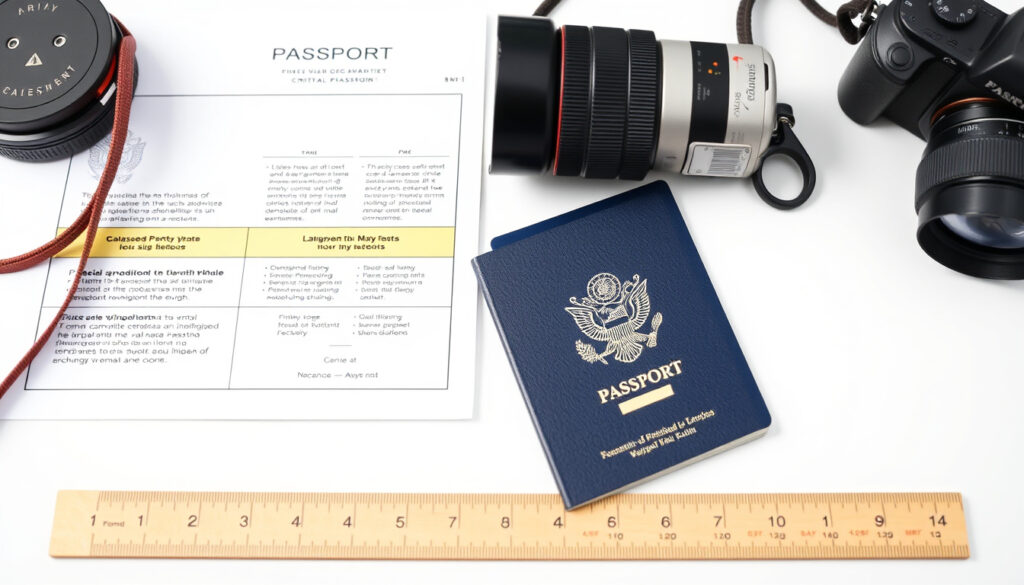
ICA Passport Photo Requirement: Size, Rules & Fixes
Getting your Singapore passport photo wrong can mean a frustrating trip back to the photo booth — or worse, a delayed application. The rules from the Immigration & Checkpoints Authority (ICA) are clear once you know what to look for, and knowing them ensures your photo is accepted the first time.
Photo dimensions: 35 mm wide x 45 mm high ·
Digital resolution: 400 x 514 pixels ·
Background color: White only ·
Photo age limit: Taken within the last 3 months ·
File format (digital): JPEG
Quick snapshot
- Photo size must be 35 mm x 45 mm (ICA Official Photo Guidelines)
- Digital photo must be 400 x 514 pixels (ICA Official Photo Guidelines)
- White background is required (PhotoAiD Singapore Passport Guide)
- Neutral expression, mouth closed (IC Photo Singapore)
- Whether minor shadows on the background are always accepted (ICA guidelines are silent on tolerance) (Passport Photo Software)
- Exact acceptable head-size range (70–80% is recommended, not strictly enforced per Passport Photo Software)
- Photo must be taken within the last 3 months (IC Photo Singapore)
- Use the ICA online photo checker before submitting (ICA Photo Guidelines) (Passport Photo Software)
- Prepare two identical physical copies if applying in person (Passport Photo Software)
Seven key specs, one pattern: ICA enforces strict standards aligned with international ICAO and ISO guidelines. Here’s the official breakdown.
| Requirement | Specification |
|---|---|
| Official source | Immigration & Checkpoints Authority (ICA) – photo-guidelines page (Government of Singapore) |
| Photo dimensions (print) | 35 mm x 45 mm |
| Digital photo resolution | 400 x 514 pixels |
| Background color | White only |
| Recency limit | Taken within the last 3 months |
| File format | JPEG (digital submission) |
| Finish (if printed) | Matte or semi‑matte (non‑reflective) |
The implication: every single spec must be met; there is no margin for approximations.
What are the ICA photo requirements?
ICA’s official page provides a concise but thorough set of rules. Here’s what you need to know for each category.
Official dimensions and resolution
Your physical photo must be exactly 35 mm wide and 45 mm high. For digital submissions via ICA e‑Services, the image must be 400 x 514 pixels — no scaling or cropping tricks (ICA Official Photo Guidelines). The recommended printing resolution is 600 dpi to keep details sharp (PhotoAiD Singapore Passport Guide).
- Head height should be about 74% of the photo frame
- Distance from top of photo to top of hair: 4 mm
- Head size in physical photos: 32–36 mm, occupying 70–80% of the image (Passport Photo Software)
A patient applicant who measures head size against a ruler will avoid the most common size-related rejections.
Background and facial appearance
The background must be plain white. If you have white hair, a light grey background is also acceptable (PhotoAiD Singapore Passport Guide). The photo must be in colour – black‑and‑white images are not allowed (ICA Official Photo Guidelines). Your face should be evenly lit with no shadows or colour casts.
- Both eyes must be open and looking directly at the camera
- Shoulders and hair must be clearly visible
- No hair covering the face
Recency and file format rules
The photo must have been taken within the last three months (IC Photo Singapore). Digital submissions must be in JPEG format, maximum file size 2 MB (PhotoAiD Singapore Passport Guide). Printed photos should be on matte or semi‑matte paper to avoid glare (ICA Official Photo Guidelines).
You must submit a passport-sized, digital, colour photograph taken within the last three months.
– ICA passport application page (Government of Singapore)
Can I smile in a passport photo in Singapore?
The short answer: no. ICA requires a neutral expression with mouth closed. This is not negotiable.
Allowed facial expressions
A neutral expression means your face is relaxed, both eyes open, mouth closed, and no visible teeth. Smiling — even a closed‑mouth smile — may cause the photo to be rejected if it alters your facial features (IC Photo Singapore).
Mouth closed vs. open
Your lips must be together. An open mouth, even slightly, is grounds for rejection. This rule applies to all ages, including infants where a natural closed‑mouth expression is expected.
A neutral expression is required, no smiling. Eyes must be open and looking directly at the camera.
– IC Photo Singapore (photo specialist)
Biometric matching algorithms rely on stable facial landmarks — a smile changes the shape of the mouth and cheeks. Singapore follows ICAO standards, so consistency for machine‑readable passports is the reason behind the strict rule.
What colors are not allowed for a passport photo?
While ICA does not ban specific clothing colours, some choices increase the risk of rejection.
Clothing color restrictions
White or very light clothing can blend into the white background, making your shoulders disappear. Uniforms (military, police, airline) are not allowed as they could imply official status. Patterns and busy prints are discouraged because they distract from facial recognition (ICA Official Photo Guidelines).
Background color rules
The background must be white — no patterns, gradients, or objects. Red‑eye or colour casts in the photo will cause rejection. The sRGB colour profile is recommended for digital photos to ensure consistent colour rendering (IC Photo Singapore).
The pattern: clothing color and background must work together to create a clear, distraction-free image.
Why does ICA keep rejecting my photo?
Most rejections fall into a few predictable categories. Here are the confirmed reasons and how to fix each.
Common rejection reasons
- Photo too old – more than three months since taken.
- Incorrect dimensions or resolution – not exactly 35×45 mm or 400×514 pixels.
- Non‑white background – shadows, colour casts, or patterned walls.
- Shadows or uneven lighting – light source should be frontal and even.
- Glasses with glare or thick frames – avoid any reflections that obscure eyes.
- Selfies are not accepted – they often fail quality checks (ICA Official Photo Guidelines).
- Smiling or open mouth – neutral expression only.
How to fix each issue
- Retake the photo if it’s older than three months.
- Use a photo‑editing tool to crop to exactly 35×45 mm (or 400×514 pixels for digital).
- Position yourself against a plain white wall with even lighting.
- Remove glasses or angle them to eliminate glare.
- Have someone else take the photo – no selfies.
- Keep a serious, relaxed expression with mouth closed.
Even after fixing these, some subtle issues like a slight shadow under the chin can still trigger a rejection. The safest approach: use the ICA photo checker tool before submitting.
How to check if a photo is ok for a passport?
Before you pay the application fee or queue at a photo booth, validate your image.
Using the ICA photo checker tool
ICA provides a free online photo checker on its website (ICA Official Photo Guidelines). Upload your digital image and the tool instantly verifies dimensions, resolution, and background colour. It will flag any obvious issues.
Manual verification checklist
- Dimensions: 35 mm x 45 mm (print) / 400 x 514 pixels (digital)
- File format: JPEG, max 2 MB
- Background: plain white, no shadows
- Expression: neutral, mouth closed, eyes open
- Clothing: no white top that blends with background
- No glasses glare, no hair covering face
- Photo taken within last 3 months
HCS Immigration summarises the 2025 ICA requirements: 35×45 mm size, white background, neutral expression, and no smiling.
– HCS Immigration blog (Singapore immigration specialist)
Confirmed facts: Photo size 35×45 mm, digital resolution 400×514 pixels, white background, taken within 3 months, neutral expression.
What remains unclear: The exact tolerance for minor background shadows, whether 70–80% head size is strictly enforced, and whether selfies are always rejected. ICA’s guidelines do not provide explicit tolerances (ICA Official Photo Guidelines).
For every person applying for a Singapore passport — whether you’re a first‑time applicant or renewing — the rulebook is clear but unforgiving. One mismatched pixel or a stray smile can stall your application by days. The fix is simple: follow the specs exactly, use the ICA online checker, and if in doubt, visit a professional photo service that knows the ICA rules. Applicants who follow the specs exactly and use the ICA checker give themselves the best chance of a smooth application.
Related reading: CPF Minimum Sum 2026 · Personal Accident Insurance Coverage
passport-photo.online, atlys.com, passlens.com, photogov.net
Frequently asked questions
Can I wear glasses in my passport photo?
Yes, but only if the frames are thin and there is no glare on the lenses. Reflective glasses are a common rejection reason. If possible, remove them for the photo (ICA Official Photo Guidelines).
Is a digital photo acceptable for ICA?
Yes, for online applications via e‑Services. The digital photo must be 400 x 514 pixels in JPEG format, max 2 MB (PhotoAiD Singapore Passport Guide).
What should I do if my photo is rejected?
Review the rejection reasons on the ICA portal. Usually it’s a size, background, or expression issue. Retake the photo and re‑upload. If you applied by post, submit a corrected print with a new application.
Can I submit a photo I took myself?
Technically yes, but selfies are strongly discouraged because they often fail quality checks. Have someone else take the photo against a white wall with even lighting.
How long does it take to get a Singapore passport after applying?
Processing typically takes 4–6 working days if all requirements are met. Photo rejections can delay this by several days.
What is the cost of a Singapore passport?
As of 2025, the passport application fee is SGD 70 for adults and SGD 10 for children (under 16). Fees are subject to change.
Can I use the same photo for renewal?
Only if the photo was taken within the last three months and meets all current ICA guidelines. Otherwise, you need a new one.
More related posts
 Simplicité by Fresh Fruits Lab: Menu, Halal, Pet-Friendly Guide
 Bangkok Things to Do: Attractions, Budget & Itinerary
 How to Reseal Windows: DIY Guide, Costs & Pro Tips
 Back to December Chords: Taylor Swift Guitar Piano Ukulele
 Wayne Huang Siris Studios Incident: A Full Timeline
 Gardens by the Bay Parking: Rates, Free Times & Tips
 Nam Sing Hokkien Mee: Michelin Bib Gourmand Review
 SG Culture Pass Credits: Where to Use, Expiry & How to Claim
